
Products
DBXL: History
What's New in DBXL 3.6?
Published on Apr 28th 2026
- On-demand PDF generation directly from the DBXL Admin Tool
- Download or open any document as a PDF - no workflow required
- Access current or historical versions as PDF
- Bulk download: select multiple documents and receive a ZIP of PDFs
- URL-based PDF access - respects document type permissions
- Flexible view selection: set a default per doctype or override per action
- JSON Web Token (JWT) authentication for FormsViewer-to-DBXL connections
- Short-lived bearer tokens as a modern alternative to DBXL User Keys
- Centralized rotation and revocation - no static secrets in config files
- Aligns with SOC 2, ISO 27001, and HIPAA expectations for credential lifetime management
- Configurable per DBXL instance - run different issuers and policies per tenant or environment
- Standards-based: works with any OIDC provider (Entra ID, Okta, Auth0) for SSO and MFA
- Extends JWT authentication to Central Flows submissions - removes the need for long-lived User Keys in Central Flows workflow config
What's New in DBXL 3.5?
Published on Oct 18th 2022
- Fixed an issue with deleting or reshredding documents mapped with an identity column on Windows Server 2022 Datacenter: Azure Edition
- When uploading a new XSN to an existing document type, the user is warned if the version is greatly different from the existing XSN
- DBXL Rendering no longer returns an error on blank email addresses
- DBXL Rendering now offers new configuration options:
- Skip sending email for specific document types
- Skip sending email for all document types
- Additional email retry options in case of an SMTP error
What's New in DBXL 3.4?
Published on Apr 1st 2021
- A new feature for locking or unlocking documents – pass in a user name and/or expiration minutes for complete control over the locking experience
- Additional "With User Key" web methods
- GetDocumentHistory
- GetDocumentVersion
- Reminders – on demand and pre-set, dynamic or static time frames
What's New in DBXL 3.3?
Published on Mar 13th 2019
- Modified print XSLT to fix issue with whitespace due to CSS included in XSLT
- Fixed sorting on version numbers in DAT
- Added feature to Save PDF and XML mapping on SaveAs
- Added new WithUserKey APIS for LockDocument and UnlockDocument
- Fixed bug on Database mapping columns not being populated
- Fixed bug for XML rendering with Rich Text and allowed setting innerXml
- Fixed XML rendering for UseDestXpathInnerXml and UseSourceXpathInnerXml
- Fixed bug for null SourceDocID in XML rendering
- Fixed issue on SoapAction with GetUserInfoByEmail
- Removed New and Open links on DAT
- Fixed delays when saving a Document Type
- New improved layout for PDF/Email mapping tab in DAT
- Fixed error message for IIS Windows Auth in installer
- Removed use of root site app pool and fixed bug with application pool not getting set
- Fix exception on ApplicationPool lookup
- Improved error handling, null checks when loading PDF and XML mappings
- Fixed bug to prevent overwriting existing doctype when doing SaveAs
What's New in DBXL 3.2?
Published on May 19th 2017
Web Admin
- Query Builder with ability to save queries
- Excel Import mapping (XLS to XML) with execution history
- DocType history - shows what area was modified in each update
- Fix for incorrect "unsaved changes" warning before reshredding
- Fix for issue with solution group not saving
PDF Email
- Feature to send email without PDF
- Feature to use XPath formulas in PDF mappings, e.g. concat(…), substring-before(…)
- Fix for radio buttons not re-loading correctly
- Fix for mappings not saving successfully
- Improved error logging - show which DocId had errors
What's New in DBXL 3.1?
Published on October 27th 2016
Features
- New Admin “Dashboard” replaces DBXL Admin Tool
- Reduce your management time – the browser version is much faster
- No InfoPath filler, no cry – no more whiny authentication prompts
- Usage and Error Reporting
- Quickly see what’s going on with Usage Stats
- See errors quickly from the dashboard
- New UI for PDF Automation
- Easily setup and configure PDFs generation for forms
- Easily setup and configure dispatch SQL-to-XML scenarios too
- O365 Updates
- Revamped Synch App – we’ve rewritten the Remote Event Receiver (RER) app
What's New in DBXL 3.0?
Published on October 15th 2015
Features
- Render forms as PDF – no workflow needed (Enterprise Only)
- Archive PDF copies to your folder or library
- Query and Submit external databases anonymously
- Send images as attachments in email
- Create email based on the HTML view of your form
What's New in DBXL 2.9?
Published on July 11th 2014
Features
- Event Receiver now allows detecting whether the XML content of the form changed
- The new AddSharePointKeysToDBXL.ps1 Powershell script is helpful for some upgrade scenarios
- Report Builder improvements, such as updating an existing spreadsheet and reloading a query
- Image Mapping Feature
- QuerySharePoint allows specifying a viewName
What's New in DBXL 2.8?
Published on October 6th 2013
- DBXL v2.8 has been updated to work with InfoPath 2013 and SharePoint 2013.
- In previous versions of DBXL, Qdabra Software recommended installing DBXL on the SharePoint site to ensure integration between DBXL and SharePoint. The InfoPath form would be configured to include a data connection to submit the XML form to the DBXL Web Service. The DBXL Document Type would then be configured to map to SQL tables and/or map to a SharePoint Form Library.
- Starting with DBXL v2.8, Qdabra Software no longer recommends installing DBXL on the SharePoint server. DBXL will still map XML data to SQL, but the form no longer needs to submit to the DBXL web service, and DBXL does not need to be installed on the SharePoint site. This is all made possible thanks to the new Event Receiver, which creates a "bridge" between DBXL and the SharePoint site.
What's New in DBXL 2.7?
Published on December 21st 2012
- Formsinstaller allows for the easy installation of forms like QueryBuilder.
- DBXL now allows mapping to and receiving data from non-DBO schemas.
- A new web method called SubmitDocumentAsUser allows using a DBXL Submit data connection to submit a document from a sandboxed form (a form with code or qRules). If using SubmitDocument, the submit operation would record a system account as the submitter, instead of the actual current user.
- QueryBuilder now allows selecting SQL columns using dropdowns instead of using the taskpane.
- In the DBXL Administration Tool, the Database tab now uses dropdowns instead of the taskpane for any database entities (tables, columns, foreign key columns).
- The XML-to-XML scenario now supports using keys instead of DocIDs. By adding an attribute called submitKey to the XTP node, DBXL generates a GUID and submits with that as the key the first time the document is submitted. It will then place the key in the submitKey attribute.
- In previous versions of DBXL, there was no way to map values into the metadata fields (Title, Author, Description) for child documents, so they would always show up blank. The QdSubDocumentMapping form now has a section for indicating the XPaths to use to easily pull out Title, Author and Description.
- The Qdabra databases now contain a view called DocumentAccessHistory which allows viewing of the entire access history of documents stored in DBXL.
- QuerySharePoint now allows specifying a view for the list being queried. The QuerySharePoint web service takes the list GUID in the format {6963D648-185B-4B18-ABB0-49848B9561FD}.
- The DBXL Server installer now sets the IdleTimeout in the application pool to zero (0). This prevents the application pool from being shut down.
What's New in DBXL 2.6?
Published on December 15th 2011
- XML to XML Mapping: DBXL supports submitting XML from one form to another, without code.
- Apps Web Part: Create an iconic app interface for your forms
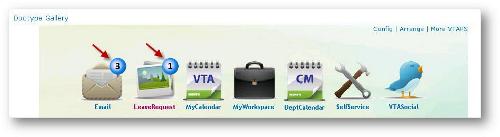
- Improvements to the Standalone Dashboard, including better performance
Editions
- Database Accelerator Services
- Database Accelerator Client
What's New in DBXL 2.5?
Published on April 1st 2011
- Non-IIS Standalone: DBXL Standalone was introduced in v2.4 and let you offload forms to a laptop and synchronize with your DBXL or SharePoint server in the cloud. This means faster open times and offline usage. In v2.5, we remove the IIS requirement. This makes it easier to install and configure and also makes it more secure.
- Report Builder: Quickly report on your XML data in SQL even if you haven’t defined the mapping. Report builder is a tool that allows you to build a filtered query and export the results to Excel.
- Non-DocID "Names" for SharePoint: Supports promoting a file name value to SharePoint on submit instead of promoting DocID. This feature allows for easier migration.
- Expense Report Sample: Included as part of the install, this sample makes it easy to try the product demonstrations and tutorials.
- XSN History: Saves all versions of any doctype that is used on Qdabra FormsBoard by default.
Editions
- Database Accelerator Services
- Database Accelerator Client
- Database Accelerator Data Query
What's New in DBXL 2.4?
Published on June 25th 2010
- "Side by Side" Web Method and Template part (XTP): Integrate your InfoPath solution with DBXL quickly and easily.
- Improved Support for IPFS Forms with Code Behind: DBXL "Side by Side" makes it even easier to integrate InfoPath Form Services (browser) forms with DBXL.
- Standalone Version: DBXL can now be installed on a separate web front end in addition to SharePoint. This reduces IT support costs associated with some SharePoint installs. While DBXL still fully supports an integrated SharePoint solution, this option is for those who prefer or require DBXL to be installed on a standalone web server.
- Desktop Dashboard: DBXL now supports a full client solution which can be integrated with a DBXL Services OR used to report on InfoPath forms in SharePoint document libraries. Desktop Dashboard also allows for an InfoPath offline solution with or without SharePoint.
- Load Balancing: DBXL now fully supports installation on multiple Web Front Ends (WFE).
- Versioning: Use Convert to make significant changes to your schema without leaving old data behind.
- Notifications: Receive server-side e-mails when submitting or assigning a form.
- Migration: Easily migrate existing forms into SQL.
- Save Images as Links: Built-in support for converting images to links.
- FormsViewer: Simple forms can now be opened in the browser and submitted to DBXL without SharePoint or InfoPath Form Services.
Editions
- Database Accelerator Server, Standalone
- Database Accelerator Server, for SharePoint
- Database Accelerator Desktop Dashboard
- Database Accelerator Data Query
See it in Action