

Products
DBXL: Do More with Your Data
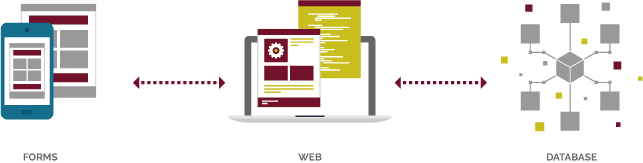
Our database accelerator, DBXL, allows you to report on your InfoPath Form Data by mapping your data to SQL. Quickly deploy InfoPath solutions with the new administration dashboard. The visual mapping interface makes it easy to create mappings and queries. Simplify your SharePoint solution by having all your InfoPath forms in one place.
Why DBXL?
- Large Scale Data Collection
- Connect your forms to an enterprise grade, scalable database
-
Reporting Made Easy
- Supports any level of repeating data
- Report on data in your existing form libraries
- Our reduced time to load data from SQL or SharePoint allows you to query data based on specific fields in your form
- Simplify your SharePoint Solution and Quickly Deploy New Solutions
- Using the Admin Dashboard to create a mapping to your database
- DBXL supports server side e-mail notifications, item-level permissions and viewing in the browser
- Connect one form to another to chain your business processes across multiple forms
- Map InfoPath forms to different libraries or even different sites
- Speed up submit time for your users - DBXL reduces the wait time when users click the submit button
What's New in DBXL 3.6?
Published on Apr. 28th 2026
- Security
- Performed a comprehensive AI-assisted security audit of the DBXL server; all findings were addressed.
- Template stylesheet processing hardened: script execution is disabled and external resource loading is blocked for untrusted templates.
- Fixed a SQL injection issue in query filter processing; filter values are now strictly validated, and malformed filter XML returns an explicit error.
- Blocked path traversal in template file serving.
- Hardened outbound requests (QuerySharePoint and data connection file fetches) against server-side request forgery.
- Hardened XML parsing against XXE and entity-expansion attacks across document ingest and import paths.
- Added standard HTTP security response headers, MIME-sniffing protection, and cookie hardening.
- Began retiring legacy DBXL User Keys in favor of Client Secret token authentication (FormsViewer 11.12 adds support for Client Secret-based communication with DBXL).
- On-demand PDF generation directly from the DBXL Admin Tool
- Download or open any document as a PDF - no workflow required
- Access current or historical versions as PDF
- Bulk download: select multiple documents and receive a ZIP of PDFs
- URL-based PDF access - respects document type permissions
- Flexible view selection: set a default per doctype or override per action
- JSON Web Token (JWT) authentication for FormsViewer-to-DBXL connections
- Short-lived bearer tokens as a modern alternative to DBXL User Keys
- Centralized rotation and revocation - no static secrets in config files
- Aligns with SOC 2, ISO 27001, and HIPAA expectations for credential lifetime management
- Configurable per DBXL instance - run different issuers and policies per tenant or environment
- Standards-based: works with any OIDC provider (Entra ID, Okta, Auth0) for SSO and MFA
- Extends JWT authentication to Central Flows submissions - removes the need for long-lived User Keys in Central Flows workflow config
Pricing
Qdabra Database Accelerator (DBXL) – one installation, unlimited usage
| Price per instance | $3,000/year |
| Designer Form Templates (XSNs) | Unlimited |
| Filler Forms (XMLs) | Unlimited |
| Active Directory Web Service (ADWS) | Included |
- Includes 4 hours support for the initial install only
- One virtual machine installation
- DBXL Package comes with Query Builder, Document Deployer, and Bulk Edit tool
See also Qdabra Solution Support Plans
Contact Us...Download
Free Trial Available!
See also DBXL Installation Guide, DBXL Azure Installation Guide
Contact Us for Free Trial DownloadSystem Requirements
- Server
- Windows Server 2008 or later
- IIS Installed and configured
- Windows Azure D2/D2v2 for cloud
- Microsoft .NET Framework 4.5.2 or later
- SQL Database
- SQL Server 2005 or later, or
- SQL Server Express or later
- Forms Client
- InfoPath 2003, 2007, 2010, 2013
- FormsViewer
- SharePoint
- Not required, but we support
- SharePoint Foundation 2010/2013/2016 (Standard or Enterprise are fine too)
- SharePoint Online / Office 365
- Not required, but we support
Support
We recommend purchasing four hours of support for initial deployment and form modifications.